
What is the Big Deal on Netgear WiFi Extenders?
In today’s world, having a stable and reliable internet connection is essential. With the increasing use of smart devices, gaming consoles, and other internet-connected gadgets, having a solid WiFi signal is crucial. However, many people face difficulties when it comes to maintaining a stable and strong WiFi signal throughout their home or office, and that’s where Netgear WiFi Extenders come in handy.
Netgear WiFi Extenders are devices designed to amplify and extend the WiFi signal in your home or office. They work by receiving the WiFi signal from your router and then re-broadcasting it to areas where the signal may be weak or non-existent. This helps to improve the overall coverage of your WiFi network, ensuring that all your devices have access to a strong and stable Internet connection.
However, many users experience common issues with their Netgear WiFi Extenders despite their usefulness. These issues include slow internet speed, difficulty setting up the device, and connectivity problems. These problems can be frustrating, primarily when you rely on your WiFi for work, entertainment, or communication.
One of the most common issues experienced by users is a weak or unstable WiFi signal, even when using a Netgear WiFi Extender. This can be due to various reasons, including interference from other electronic devices, outdated firmware, or incorrect extender placement. It’s essential to troubleshoot these issues to ensure you get the best performance from your Netgear WiFi Extender.
Another common issue is difficulty in setting up the device. While Netgear WiFi Extenders are generally easy to set up, users may face challenges if they are unfamiliar with the process. This can lead to frustration and wasted time, especially if the user repeatedly tries to set up the device.
The Technical Problems with Netgear WiFi Extenders.
Netgear WiFi Extenders are designed to provide better WiFi coverage and connectivity throughout your home or office. However, like any technology, they are not immune to technical problems. In this article, we’ll look at some of the most common technical issues experienced by Netgear WiFi Extender users and provide possible solutions.
- Connection Drops One of the most frustrating technical problems with Netgear WiFi Extenders is when the connection drops. This can happen for various reasons, including interference from other electronic devices, weak signal strength, or outdated firmware. To fix this issue, try moving the extender closer to the router or changing the extender’s location to a spot with less interference. Also, ensure that your extender’s firmware is up to date.
- Slow Internet Speed, Another common technical issue with Netgear WiFi Extenders is slow internet speed. This can be due to various reasons, such as outdated firmware, outdated router or extender hardware, or incorrect placement of the extender. To solve this issue, ensure that your firmware is up to date. Secondly, try resetting your router and extender, and check for any physical damage to the hardware. Finally, place the extender in an area free from obstructions and far from other electronic devices.
- Inability to Connect to the extender Another technical issue with Netgear WiFi Extenders is the inability to connect to the extender. This can be due to incorrect login credentials or firmware issues. Try resetting your extender to factory settings and reconfiguring it from scratch. Ensure that you have the correct login credentials, and if the problem persists, check for firmware updates or contact customer support.
- Random Disconnections Sometimes, Netgear WiFi Extenders may disconnect from the network randomly, leading to a loss of connectivity. This can be due to outdated firmware, interference from other electronic devices, or incorrect configuration settings. To solve this issue, ensure that your firmware is current, move the extender away from other electronic devices, and verify your configuration settings.
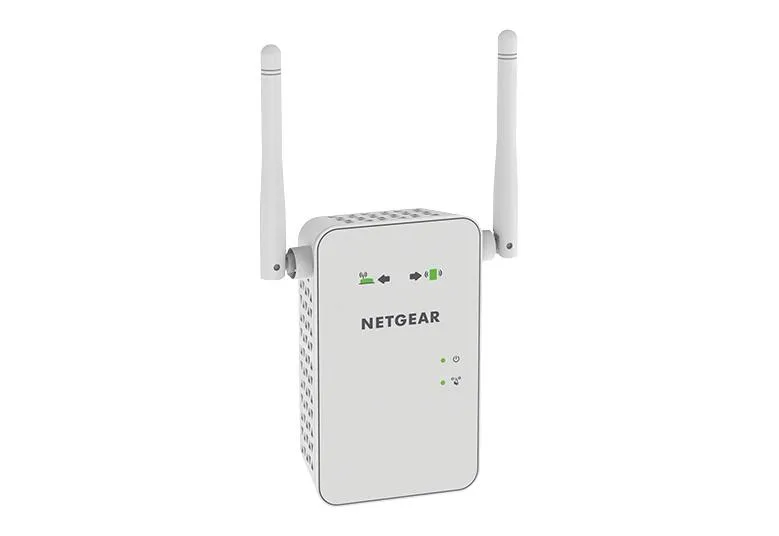
NETGEAR Wi-Fi Range Extender EX3700 Pro’s
Enhanced WiFi Coverage With the NETGEAR WiFi Range Extender EX3700, you can extend your WiFi network coverage to previously unreachable areas. This ensures that all your devices have access to a strong and stable internet connection, no matter where they are in your home or office.
- Improved Connectivity The EX3700 offers faster speeds and more stable connectivity, making it perfect for streaming, gaming, and downloading. Its dual-band technology lets you connect more devices to your network and enjoy a smoother online experience.
- Cost-Effective Solution Compared to upgrading your existing router or investing in a new one, the EX3700 is an affordable solution for improving WiFi coverage and connectivity. It’s a cost-effective way to enhance your network without breaking the bank.
- Easy to Use The EX3700 is easy to set up and use, even for those who are not tech-savvy. With its intuitive user interface and easy-to-follow instructions, you can have your extender up and running quickly.
NETGEAR Wi-Fi Range Extender EX3700 Con’s
While the NETGEAR WiFi Range Extender EX3700 offers a range of benefits and features, like any other technology, it is not without its problems. In this article, we’ll look at some of the issues users have experienced with the NETGEAR WiFi Range Extender EX3700.
- Connection Issues One of the most common problems that users have experienced with the NETGEAR WiFi Range Extender EX3700 is connection issues. This can include the extender not connecting to the existing network or dropping the connection frequently. These connection issues can be frustrating and make it difficult to use the extender effectively.
- Slow Speeds While the NETGEAR WiFi Range Extender EX3700 is designed to provide fast and reliable speeds, some users have reported slow speeds when using the extender. This can be due to various factors, including interference from other devices, distance from the extender, or outdated firmware.
- Compatibility Issues Although the NETGEAR WiFi Range Extender EX3700 is designed to be compatible with all WiFi routers, some users have reported compatibility issues when setting up the extender. This can be due to various reasons, including outdated router firmware, router incompatibility, or extender malfunction.
- Overheating The NETGEAR WiFi Range Extender EX3700 can overheat when used for extended periods. This can cause the extender to malfunction or shut down completely, frustrating users who rely on the extender for their internet connectivity.
- Limited Coverage Area While the NETGEAR WiFi Range Extender EX3700 is designed to extend the coverage area of your WiFi network, it has limitations. The extender’s coverage area may be limited by factors such as the size of your home or office, the location of the extender, or interference from other devices.
Possible Solutions:
- Connection Issues: Ensure that the extender is in a location that is close to the router and free from obstructions. Try resetting the extender or updating the firmware to resolve connectivity issues.
- Slow Speeds: Ensure that the extender is in a location that is free from interference and that it has the latest firmware updates. Consider upgrading your internet service or router to improve speeds.
- Compatibility Issues: Ensure that your router is compatible with the NETGEAR WiFi Range Extender EX3700 and that it has the latest firmware updates. Consider resetting the extender or contacting NETGEAR support for assistance.
- Overheating: Ensure that the extender is in a well-ventilated location and that it is not covered by other devices or objects. Consider purchasing a cooling pad or fan to prevent overheating.
- Limited Coverage Area: Consider purchasing additional extenders or upgrading your router to improve the coverage area of your WiFi network. Consider using a mesh WiFi system for larger coverage areas.
In Conclusion:
AVN Advisors believes the best way to connect to any of your WiFi devices will be using Access Points rather than Extenders. For instance, the Netgear WAX630 would be the best solution, and the second best way to handle your WiFi would be a Netgear Orbi system. There is no question that in todays world, we all need our homes to have full WiFi coverage. Unquestionably, the best way is to use the Negear WAX630’s with an upgraded 2.5 Gigabit switch to handle the WiFi 6e speeds over 2 Gigabit. If you have Gigabit Internet from your Provider, connecting to access points like the Netgear WAX630 you will need a multi gigabit switch to handle the bandwidth.
The NETGEAR WiFi Range Extender EX3700 is a band aid; however, it’s the best one, we believe, on the market. You can purchase it from the link here below from Amazon.